Find the weapon and its unlock requirement
The comparison below uses the six weapon tooltips in CT602’s Epilogue 3 selection menu. The preceding restart shows Steam PC v1.0.2_b324_Release_PC_Steam. Earlier chapter unlock notifications come from ZlXgames’ v1.0.0 recording; they are recorded progression checkpoints, not a claim that every later patch has identical rewards.
Singing’s Epilogue 1 acquisition is also stated by its official Steam achievement. Lapis is a restoration reward: reaching a chapter number alone does not replace restoring its specific fragment.
| Weapon | Input and critical condition | Recorded unlock checkpoint |
|---|---|---|
| Scissors | Four-hit combo; the final attack crits. | Starting weapon. |
| Giant Scissors | Three-hit combo; the final attack crits. | Chapter 1 completion notification. |
| Broken Scissors | Hits build Sharpness; full Sharpness makes attacks critical. | Chapter 2 completion notification. |
| Magic Scissors | Charge, then release piercing projectiles; level 1+ releases crit. | Chapter 3 completion notification. |
| Singing Scissors | Load projectiles that fire one at a time at the strongest enemy; periodic critical shot. | Obtain during Epilogue 1. |
| Lapis Scissors | Charge, then release area hits per charge level; level 1+ hits crit. | Restore Broken Weapon Fragment with the Conservator in Epilogue 2. |
Choose between the three close-range patterns
Scissors shows a 3 m radius and four attacks in its combo. Giant Scissors shows a 5 m radius and three attacks. Both give the final combo attack a critical hit. Choose Giant when the wider listed area is useful; choose the starting Scissors when its familiar four-hit sequence is easier to finish safely. The menus do not give an attacks-per-second measurement, so these figures do not establish which has higher sustained DPS.
Broken Scissors uses a different condition. Its tooltip gives 10% Sharpness gain on a hit, a 100% maximum and a four-second Sharpness duration. Sharpness raises weapon damage according to the amount held; at 100%, attacks become critical. Repeated connected hits matter here. A missed swing is not a successful hit, and this menu does not establish a damage formula for each percentage point of Sharpness.
Distinguish Magic shots from Lapis area hits
Magic and Lapis both use a charge input. Hold the assigned weapon control to fill the charge gauge, then release. Each tooltip makes level 1 the threshold for critical hits. If additional stacks remain, the charge description says the gauge can be filled further; do not assume that a fresh, unmodified weapon already has extra stacks.
Magic produces piercing projectiles according to charge level. Lapis deals area hits according to charge level instead. Magic’s panel lists a 2-second cooldown; Lapis lists 3 seconds and a 4 m radius. Both list a 0.5-second charge speed and a starting maximum stack of one in this menu.
For a line of enemies, Magic’s explicit piercing behavior is the relevant distinction. For enemies gathered within the listed area, Lapis is the area-hit choice. This is an input-and-shape comparison, not a measured damage ranking: the listed damage percentages omit attack opportunities, interruption and later upgrades.
Use Singing as a loaded ranged weapon
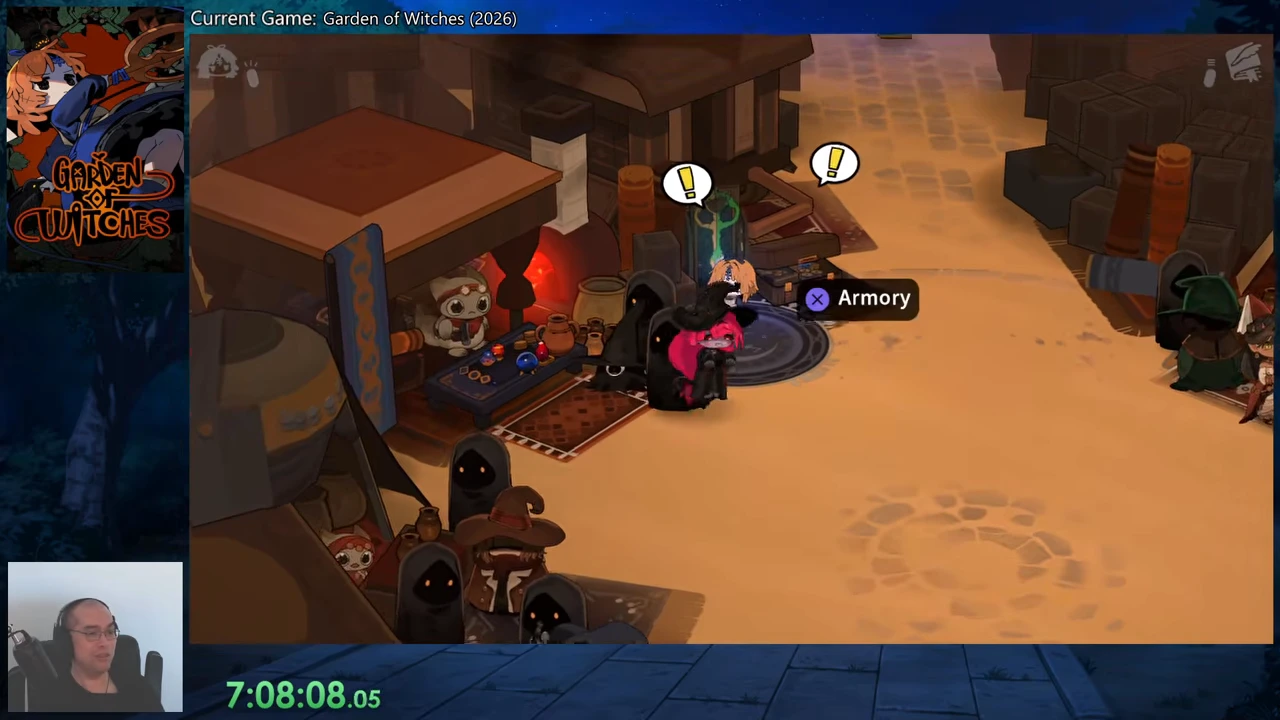
Using Singing Scissors loads projectiles. It then fires them one at a time at the strongest enemy and damages enemies within the projectile’s area. The recorded panel lists 20 ammunition, a critical threshold of five and a 3 m projectile radius.
That automatic target description belongs to Singing. It is not the wording on Magic’s piercing-charge tooltip. Choose Singing when you want this loaded firing sequence; check the weapon’s ammunition state before assuming another use is a separate burst with unlimited shots. No fire rate or reload duration is measured here.
Unlock Lapis through the Conservator
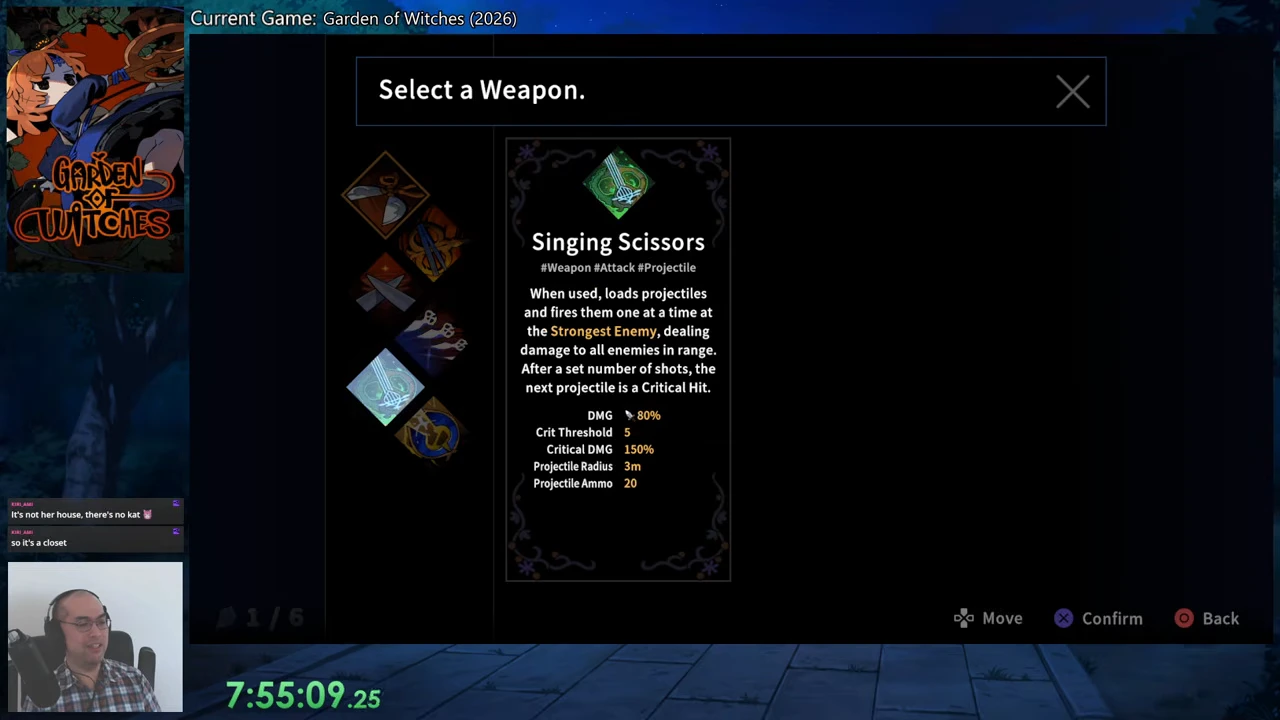
During Epilogue 2, bring the Broken Weapon Fragment from the ruins back to the caravan. After the return conversation with Bazira, follow the introduction to the Conservator. The recorded restoration panel places this fragment under Special Crafted Artifact, separately from the normal artifacts that grant stat bonuses.
Select Broken Weapon Fragment and choose Restore. Its displayed reward is the Lapis Scissors unlock. The footage then shows the Conservator’s completed-work dialogue and Lapis equipped in the subsequent Armory menu. Restoring a normal Broken Relic is a different selection and does not substitute for the weapon fragment.
- Return to the Epilogue 2 caravan with Broken Weapon Fragment.
- Speak with Bazira and the Conservator, then open Crafted Artifact Restoration.
- Choose Broken Weapon Fragment in the Special Crafted Artifact row and press Restore.
- Open the nearby Armory, highlight Lapis Scissors and equip it in the weapon slot.
Find the nearby Armory after restoration
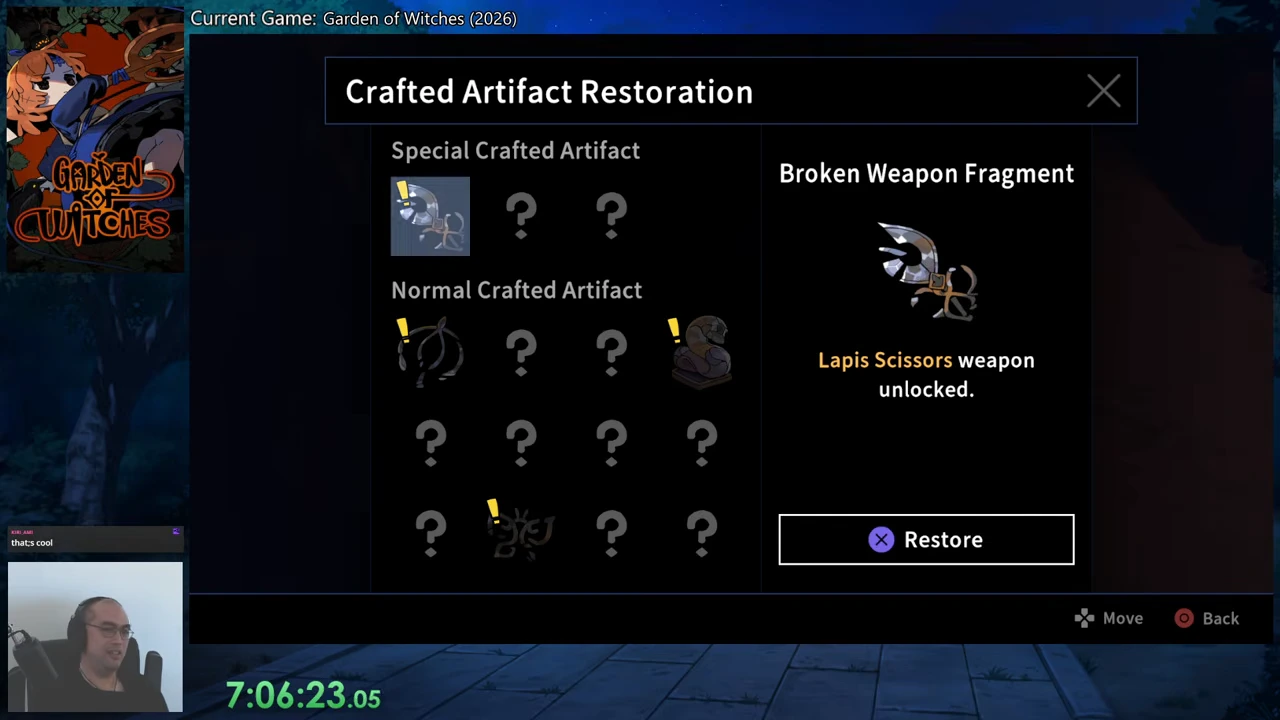
The caravan view below puts the Conservator at the workbench on the left and the Armory interaction beside the standing cabinet and circular rug. In the recorded controller layout, the Armory prompt displays X. Use the prompt shown for your own control scheme, then verify that Lapis occupies the weapon slot before leaving.
The unlock requirement above is specific; the recording does not establish a universal room coordinate or guaranteed chest for Broken Weapon Fragment. This weapon directory therefore does not turn one ruins route into a fixed-location claim. If the fragment is absent from your special-artifact row, the restoration step is not yet available.